Templates / Planners & trackers / Weekly Planner
Deep red
Tap a chip. This is the template, not a picture of it. The color is part of the paid version. The free file comes in Studio.
Weekly Planner Template
One week on one sheet, dated or not, or a whole year of dated weeks in one file, with your name on it.
Free: one theme and a small credit line at the foot, on Letter paper. On A4 paper instead.
- 52 dated weeks in one PDF$12
- Planner Set: four templates that go together$19
- All-Access Pass: every template on the site$49
Each paid file is made once, with what you typed, and its link works for a year. A set or the pass gives three makes of each template. Paid once, nothing renews.
One new template a month.
Your download has started. The paper set is yours free too: lined, graph and dot grid, with a name and date line at the top.
- 1 page, landscape
- Letter and A4
- One week, or 52 dated weeks in one PDF ($12)
- 10 themes, one of them light-ink
- Fonts: Fraunces, Inter Tight
- Personal and small-business use
- Print at 100%, not "fit to page", or the margins move. How.
- Plain copier paper is fine.
- Letter or A4? Which paper you have.
- Printing it every week? Use less ink.
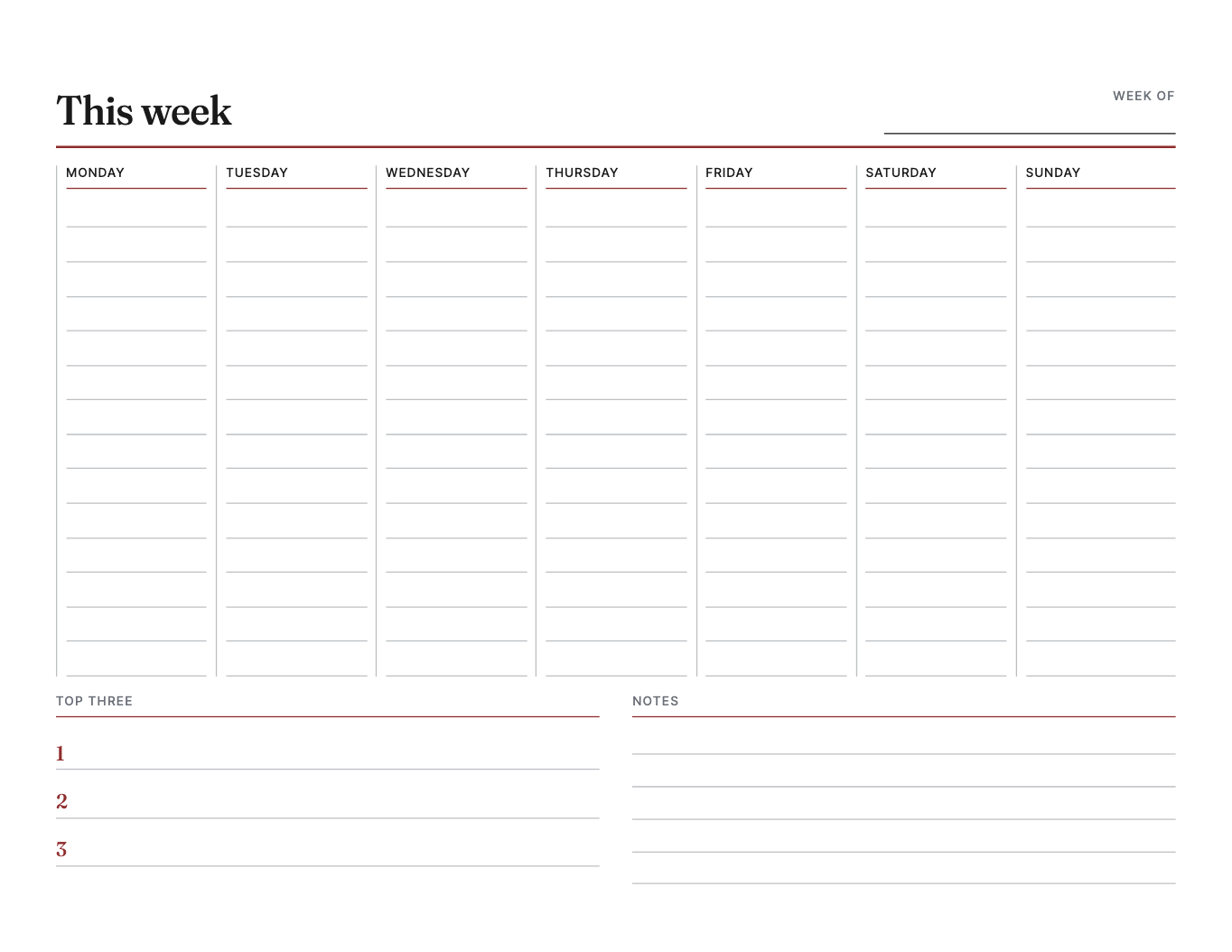
A weekly planner is the sheet most people print more than any other, and most of the ones you can find online are built for a screen and only then sent to a printer: the weekend squeezed into a corner, a pastel background that empties a cartridge, a header that belongs to someone else. This one is drawn for paper first. It is for anyone who plans a week by hand, prints the same layout every Sunday night, and wants it to look like it was made for them.
The week runs across the page in seven equal columns. Saturday and Sunday get the same room as a Tuesday, because a weekend has plans too and a column half the width is a column you stop writing in. Each day is ruled for handwriting at a pitch that fits a normal pen, with the day's name at the top and, if you want it, the date. Under the days sit the sections you turn on or off: a top three for the week, a row for meals, a habit strip with seven boxes per line, and a notes box. Leave them all off and the days take the whole page.
Dated or undated is a switch, not a second template. Undated prints the day names only, so one sheet lasts a year of Mondays. Turn Dated on, pick any day of the week you want, and the sheet fills in that week's dates, Monday to Sunday or Sunday to Saturday, whichever you start on. The heading shows the span, and it gets the turn of a month or a year right, so the last week of 2026 reads December 28, 2026 to January 3, 2027. If you want the whole year, turn on A page for every week: the file comes back with 52 sheets, each one dated for its own week, starting with the week you picked. Start it in January for the calendar year or in August for a school year, and print the weeks as you need them.
One decision worth explaining: the sections are toggles instead of separate designs. A planner with meals and habits and a planner without them are the same planner, and making you choose between two listings, or buy both, is how template sites pad their catalogs. Here it is one file, and the layout closes up around whatever you leave out, so there is never an empty box with a heading over it.
Print it at 100%, not fit to page, on ordinary copier paper; a planner is meant to be written on and thrown away. If you print one every week, pick the light-ink theme. It keeps the lines and one accent color and drops everything else. The free version is the same design in the Studio theme, undated, on Letter or A4, with a small credit line at the foot. The paid version carries your title and your name, every theme and the dates, and comes back in Letter and A4 from one purchase, with a link that works for a year. One dated week is $7; all 52 weeks in one file is $12.
Dated or undated?
Either. Undated prints the day names only, so one sheet lasts a year of Mondays. Dated fills in the dates for the week you pick; choose any day of that week and the sheet works out where it starts.
Can I get a whole year of weeks?
Yes. Turn on Dated, pick the first week, then turn on A page for every week. You get one PDF with 52 sheets, each dated for its own week, for $12. It can start any week, so a school year works as well as a calendar year.
Can the week start on Sunday?
Yes. It is a setting, and the columns reorder. The habit strip follows it too.
What can I turn on or off?
Four sections: a top three for the week, a meals row under the days, a habit strip, and a notes box. Whatever you leave off, the days grow to fill the page.
Will it use a lot of ink?
Not in the light-ink theme, which is thin lines and one accent color, with nothing filled in. It is there for exactly this sheet, the one you print every week.
Is the free version different?
It is the same design in the Studio theme, undated, Monday start, with the top three and the notes box, on Letter or A4, with a small credit line at the foot. The paid version adds your title and name, the meals row and the habit strip, a Sunday start, the other themes and the dates.
Is there a subscription?
No. You pay once for the file. There is nothing to cancel.